hahahah ang saya knina nung tym nmn sa filipino..
puro banat c carmhel at jhune naingit tuloy kme ni lola ange! haha gumawa kme ng walang patutunguhang banat! =)
ako ^_^

- mhaan_templo11
- about me Hi!! mga kabloggers ako si marinell mhaan s. templo pero puede nyo rin akong tawaging "mhaan" from I-sapphire RSHS III bago lumabas please follow tnx a lot... =D
Lunes, Setyembre 26, 2011

Miyerkules, Setyembre 21, 2011
return post
hayy! ang tagal kong hindi nakapagpost sa blog ko kc ang tagal magloading eh!!
malapit na ung LAKBAY ARAL ... buti na lng nabuo na nmn ung sayaw para sa dance explo
ang sakit ng binti ko kc nmn c kevin eh cnipa pati tuhod ko masakit den kakaparaktis....
haha gusto ko talaga magkwento kaso lng tinatamad akong magtype eh
Gud Luck sa Prelim bukas ^_^
Gud Nyt.
malapit na ung LAKBAY ARAL ... buti na lng nabuo na nmn ung sayaw para sa dance explo
ang sakit ng binti ko kc nmn c kevin eh cnipa pati tuhod ko masakit den kakaparaktis....
haha gusto ko talaga magkwento kaso lng tinatamad akong magtype eh
Gud Luck sa Prelim bukas ^_^
Gud Nyt.
Lunes, Setyembre 5, 2011
wohoo!
ang saya ngayong araw ang dameng. happy moments.
simula kaninang umaga sa sci. tech. kasama nmn sa group c anton kame ang highest 9 POINTS.
soc. stud. naka 16/20 ako sa test.
nagpraktis kme ng cheer dance
nung hapon nmn.
ayy! birth day nga pala ni vanessa nilibre nya kme ng ice cream
sa play ground nag slide c jaenie tapos sumabit ung phone nya kasama ung palda nya haha nahubaran pa cia at nandun c william nasira ung palda nia kasama ung zipper.
ayan lng muna sa ngayon! ^_^
simula kaninang umaga sa sci. tech. kasama nmn sa group c anton kame ang highest 9 POINTS.
soc. stud. naka 16/20 ako sa test.
nagpraktis kme ng cheer dance
nung hapon nmn.
ayy! birth day nga pala ni vanessa nilibre nya kme ng ice cream
sa play ground nag slide c jaenie tapos sumabit ung phone nya kasama ung palda nya haha nahubaran pa cia at nandun c william nasira ung palda nia kasama ung zipper.
ayan lng muna sa ngayon! ^_^
Sabado, Agosto 27, 2011
assignment
MS word(odt and ott), OpenOffice.org Writer
MS powerpoint(.odp and .otp), OpenOffice.org Impress
MS excel (.ods ang .ots), OpenOffice.org Calc.
MS powerpoint(.odp and .otp), OpenOffice.org Impress
MS excel (.ods ang .ots), OpenOffice.org Calc.
Linggo, Agosto 21, 2011
Biyernes, Agosto 19, 2011
Biyernes, Agosto 12, 2011
experience!
hay naku bad memory saken pero naexperience ko na den..
ang mahirap maiwanan sa skul ng kau-kau lng magkakaservice at may kasama pang bata!
phew! nakakatakot ang dilim walang pumapansin samen at dumagdag pa ung tuko lalol kameng natakot pero buti na lng sinundo na kme!
ang mahirap maiwanan sa skul ng kau-kau lng magkakaservice at may kasama pang bata!
phew! nakakatakot ang dilim walang pumapansin samen at dumagdag pa ung tuko lalol kameng natakot pero buti na lng sinundo na kme!
Martes, Agosto 9, 2011
Linggo, Agosto 7, 2011
chapter 3 lesson 3
►How To Care of Your PC
1. Computers need a good working temperature to work properly. They need to be place in a cool and dry place. You can maintain good temperature with an electric fan or air conditioning.
2. All the cables and connectors must be tied together to keep them away from walkways to avoid accidents.
3. Refrain from eating in front of a computer. Food bits attract insects like ants and cockroaches that can penetrate the hardware and cause computer malfunction. Spilled drinks, on the other hand, might cause short circuit.
4. Always use an AVR ( Automatic Voltage Regulator) to regulate electricity. Too much electric voltage might cause the unit to short. Also, turn off computers during lightning as these can cause electrical surges to the computer.
5. Do not Bump or Drop the computer peripherals or components as any damage may cause them to malfunction.
6. Avoid clutter around your computer. Use soft cloth in cleaning your computer to avoid scratches.
7. Always scan for computer viruses. Internet connection and external storage devices often carry viruses that could damage files and cause software malfunction.
* User's Health Risks and Prevention
PC's are said to be "USER- FRIENDLY", but this doesn't mean using them does not have health risks.
► Good Working Habits
Tap on the keys and mouse gently.
Avoid long, uninterrupted periods of typing
Avoid staring at the monitor for long periods. Take vision breaks and do eye exercise.
► Proper Workstation Design
Position in a well-ventilated, comfortable room.
Use an adjustable workstation and an ergonomic computer chair/
Place the monitor 16-24 inches away, at eye level or slightly at a lower angle. Tilt the monitor or adjust the light source. Adjust the brightness and contrast settings.
Use extendable / retractable legs of the keyboard.
Place mouse where it is easily accessible by your dominant hand.
Use a document holder to minimize vertical head movements.
►Proper Posture
Sit up straight and put the feet flat on the floor. Use a footrest if needed
Position your lower arms parallel with the floor and level to your keyboard, with elbows at your side.
Keeps wrists straight
Do not lean into the monitor, but sit close enough to the keyboard and the mouse to stay relaxed.
1. Computers need a good working temperature to work properly. They need to be place in a cool and dry place. You can maintain good temperature with an electric fan or air conditioning.
2. All the cables and connectors must be tied together to keep them away from walkways to avoid accidents.
3. Refrain from eating in front of a computer. Food bits attract insects like ants and cockroaches that can penetrate the hardware and cause computer malfunction. Spilled drinks, on the other hand, might cause short circuit.
4. Always use an AVR ( Automatic Voltage Regulator) to regulate electricity. Too much electric voltage might cause the unit to short. Also, turn off computers during lightning as these can cause electrical surges to the computer.
5. Do not Bump or Drop the computer peripherals or components as any damage may cause them to malfunction.
6. Avoid clutter around your computer. Use soft cloth in cleaning your computer to avoid scratches.
7. Always scan for computer viruses. Internet connection and external storage devices often carry viruses that could damage files and cause software malfunction.
* User's Health Risks and Prevention
PC's are said to be "USER- FRIENDLY", but this doesn't mean using them does not have health risks.
► Good Working Habits
Tap on the keys and mouse gently.
Avoid long, uninterrupted periods of typing
Avoid staring at the monitor for long periods. Take vision breaks and do eye exercise.
► Proper Workstation Design
Position in a well-ventilated, comfortable room.
Use an adjustable workstation and an ergonomic computer chair/
Place the monitor 16-24 inches away, at eye level or slightly at a lower angle. Tilt the monitor or adjust the light source. Adjust the brightness and contrast settings.
Use extendable / retractable legs of the keyboard.
Place mouse where it is easily accessible by your dominant hand.
Use a document holder to minimize vertical head movements.
►Proper Posture
Sit up straight and put the feet flat on the floor. Use a footrest if needed
Position your lower arms parallel with the floor and level to your keyboard, with elbows at your side.
Keeps wrists straight
Do not lean into the monitor, but sit close enough to the keyboard and the mouse to stay relaxed.
Huwebes, Agosto 4, 2011
long offline
haha antagal kong hindi nakapagbukas ng blog at nakapagonline sa facebook 4 days haha buti natiis ko haha now I'm BACK!!!
Sabado, Hulyo 30, 2011
MTAP
nagmtap kme kanina saya ang baet ng proctor nmen nawawala daw ung pangalan nila hahaha peace
sumabay sa service nmen cla junel ,chrizel at karl nagtabi sa upuan c jieg at c junel kinikilig c jieg habang c karl nmn ay na bh broken hearted huhu wawa nmn pero cguro masaya sya dahil nahawakan nya c jieg sa kamay nung binubukas nila ung bintana hahaha
kakilig much
sumabay sa service nmen cla junel ,chrizel at karl nagtabi sa upuan c jieg at c junel kinikilig c jieg habang c karl nmn ay na bh broken hearted huhu wawa nmn pero cguro masaya sya dahil nahawakan nya c jieg sa kamay nung binubukas nila ung bintana hahaha
kakilig much
Biyernes, Hulyo 29, 2011
ang lakas lakas ng ulan :))
grabe ang lakas talaga ng ulan halos nangaligo kme ung pinakamamahal kong sapatos basang basa nakatatlong beses akong magpalit ng damit sinugod nmin ang malakas na ulan nila erolyn tatlo kme sa isang payong haha
field trip daw
haha ang saya sa van kain lang ng kain andame kceng food eh sbi nila field trip daw nmen kanina eh ang saya say nakakatakot ung maskara ni camilli s jhune naman sobrabg kinabahan dahil ndi nya makita ung salamin hinanap nmin sa van ndi nila nakita ako nmn tiningnan ko sa ilalaim buti na lng nakita ko haha...
enjoy talaga..
enjoy talaga..
Huwebes, Hulyo 28, 2011
proud to be!..
UST: We accept WISE students only.
FEU: We accept GREAT students only.
DLSU: We accept COMPETITIVE students only.
ADMU: We accept INTELLIGENT students only.
UP: We accept GENIUS students only.
RSHS: WE DON'T NEED TO ACCEPT WISE, GREAT, COMPETITIVE, INTELLIGENT, GENIUS STUDENTS. WE CREATE THEM!!
I'm proud to be in RSHS!! REGIONAL SCIENCE HIGH SCHOOL
FEU: We accept GREAT students only.
DLSU: We accept COMPETITIVE students only.
ADMU: We accept INTELLIGENT students only.
UP: We accept GENIUS students only.
RSHS: WE DON'T NEED TO ACCEPT WISE, GREAT, COMPETITIVE, INTELLIGENT, GENIUS STUDENTS. WE CREATE THEM!!
I'm proud to be in RSHS!! REGIONAL SCIENCE HIGH SCHOOL
Miyerkules, Hulyo 27, 2011
3 IDIOTS...
Rancho is calling someone because there is an emergency.He saw a girl with a motorcycle,he borrow the motorcycle with the girl. They go to a house and brought a sick person into the hospital with the motorcycle. In the hospital his one friend saw his father and because of that he thanked Rancho.the girl fell in love with Rancho and she think that all the characters in the television is Rancho and she think that she is dancing with him. on that morning she go to the hospital and she saw that the three were sleeping so she wake up them because they have an exam. when they go to their exam they were 30 min. late but they take the test. their teacher did not accept their test so when their teacher is arranging the test papers they rumble the test papers and put their test papers to others. After that they went to see the results Rancho's two friends was in the 2 last positions. they taught that Rancho did not pass the test. but the girl saw that Rancho is the top notcher. After that they drink too much alcohols. After many days, the two go to Rancho's house. They saw Rancho's father that is dead. They try to speak with him but they saw different face. They asked him where is their friend but he get his rifle, so they get his father's urn and they said to him that they will flash the ashes in the toilet. So he tell the truth that he is a true Rancho and the one their friend is their gardener. When the fake Rancho is in the 6th grade the true Rancho always gives his assignment to him for him to answer. When the math teacher saw the fake Rancho solving a 10th grade math, he was to say it to the principle but the true Rancho's father said that he said that he is his son Rancho so he study until college as Rancho
So the true Rancho give the address of the fake Rancho. When the two was on their way to the fake Rancho's house the true Rancho saw that the urn do not have ashes. He was tricked by the two. The last part I have watch is they are drinking and they are having fun.
So the true Rancho give the address of the fake Rancho. When the two was on their way to the fake Rancho's house the true Rancho saw that the urn do not have ashes. He was tricked by the two. The last part I have watch is they are drinking and they are having fun.
Lunes, Hulyo 25, 2011
different types of computers

A computer is one of the most brilliant inventions of mankind. Thanks to the computer technology, we were able to achieve an efficient storage and processing of data; we could rest our brains by employing computer memory capacities for storage of the information. Owing to computers, we have been able speed up daily work, carry out critical transactions and achieve accuracy and precision in work output. The computers of the earlier years were of the size of a large room and were required to consume huge amounts of electric power. However, with the advancing technology, computers have shrunk to the size of a small watch. Depending on the processing powers and sizes of computers, they have been classified under various types. Let us look at the classification of computers.
Different types of Computers
Based on the operational principle of computers, they are categorized as analog computers and hybrid computers.
Analog Computers: These are almost extinct today. These are different from a digital computer because an analog computer can perform several mathematical operations simultaneously. It uses continuous variables for mathematical operations and utilizes mechanical or electrical energy.
Hybrid Computers: These computers are a combination of both digital and analog computers. In this type of computers, the digital segments perform process control by conversion of analog signals to digital ones.
Following are some of the other important types of computers.
Mainframe Computers: Large organizations use mainframes for highly critical applications such as bulk data processing and ERP. Most of the mainframe computers have the capacities to host multiple operating systems and operate as a number of virtual machines and can thus substitute for several small servers.
Microcomputers: A computer with a microprocessor and its central processing unit is known as a microcomputer. They do not occupy space as much as mainframes. When supplemented with a keyboard and a mouse, microcomputers can be called as personal computers. A monitor, a keyboard and other similar input output devices, computer memory in the form of RAM and a power supply unit come packaged in a microcomputer. These computers can fit on desks or tables and serve as the best choices for single-user tasks.
Personal computers come in a variety of forms such as desktops, laptops and personal digital assistants. Let us look at each of these types of computers.
Desktops: A desktop is intended to be used on a single location. The spare parts of a desktop computer are readily available at relative lower costs. Power consumption is not as critical as that in laptops. Desktops are widely popular for daily use in workplaces and households.
Laptops: Similar in operation to desktops, laptop computers are miniaturized and optimized for mobile use. Laptops run on a single battery or an external adapter that charges the computer batteries. They are enabled with an inbuilt keyboard, touch pad acting as a mouse and a liquid crystal display. Its portability and capacity to operate on battery power have served as a boon for mobile users.
Personal Digital Assistants (PDAs): It is a handheld computer and popularly known as a palmtop. It has a touch screen and a memory card for storage of data. PDAs can also be effectively used as portable audio players, web browsers and smart phones. Most of them can access the Internet by means of Bluetooth or Wi-Fi communication.
Minicomputers: In terms of size and processing capacity, minicomputers lie in between mainframes and microcomputers. Minicomputers are also called mid-range systems or workstations. The term began to be popularly used in the 1960s to refer to relatively smaller third generation computers. They took up the space that would be needed for a refrigerator or two and used transistor and core memory technologies. The 12-bit PDP-8 minicomputer of the Digital Equipment Corporation was the first successful minicomputer.
Supercomputers: The highly calculation-intensive tasks can be effectively performed by means of supercomputers. Quantum physics, mechanics, weather forecasting, molecular theory are best studied by means of supercomputers. Their ability of parallel processing and their well-designed memory hierarchy give the supercomputers, large transaction processing powers.
Wearable Computers: A record-setting step in the evolution of computers was the creation of wearable computers. These computers can be worn on the body and are often used in the study of behavior modeling and human health. Military and health professionals have incorporated wearable computers into their daily routine, as a part of such studies. When the users’ hands and sensory organs are engaged in other activities, wearable computers are of great help in tracking human actions. Wearable computers are consistently in operation as they do not have to be turned on and off and are constantly interacting with the user.
These were some of the different types of computers available today. Looking at the rate of the advancement in technology, we can definitely look forward to many more types of computers in the near future.
Different types of Computers
Based on the operational principle of computers, they are categorized as analog computers and hybrid computers.
Analog Computers: These are almost extinct today. These are different from a digital computer because an analog computer can perform several mathematical operations simultaneously. It uses continuous variables for mathematical operations and utilizes mechanical or electrical energy.
Hybrid Computers: These computers are a combination of both digital and analog computers. In this type of computers, the digital segments perform process control by conversion of analog signals to digital ones.
Following are some of the other important types of computers.
Mainframe Computers: Large organizations use mainframes for highly critical applications such as bulk data processing and ERP. Most of the mainframe computers have the capacities to host multiple operating systems and operate as a number of virtual machines and can thus substitute for several small servers.
Microcomputers: A computer with a microprocessor and its central processing unit is known as a microcomputer. They do not occupy space as much as mainframes. When supplemented with a keyboard and a mouse, microcomputers can be called as personal computers. A monitor, a keyboard and other similar input output devices, computer memory in the form of RAM and a power supply unit come packaged in a microcomputer. These computers can fit on desks or tables and serve as the best choices for single-user tasks.
Personal computers come in a variety of forms such as desktops, laptops and personal digital assistants. Let us look at each of these types of computers.
Desktops: A desktop is intended to be used on a single location. The spare parts of a desktop computer are readily available at relative lower costs. Power consumption is not as critical as that in laptops. Desktops are widely popular for daily use in workplaces and households.
Laptops: Similar in operation to desktops, laptop computers are miniaturized and optimized for mobile use. Laptops run on a single battery or an external adapter that charges the computer batteries. They are enabled with an inbuilt keyboard, touch pad acting as a mouse and a liquid crystal display. Its portability and capacity to operate on battery power have served as a boon for mobile users.
Personal Digital Assistants (PDAs): It is a handheld computer and popularly known as a palmtop. It has a touch screen and a memory card for storage of data. PDAs can also be effectively used as portable audio players, web browsers and smart phones. Most of them can access the Internet by means of Bluetooth or Wi-Fi communication.
Minicomputers: In terms of size and processing capacity, minicomputers lie in between mainframes and microcomputers. Minicomputers are also called mid-range systems or workstations. The term began to be popularly used in the 1960s to refer to relatively smaller third generation computers. They took up the space that would be needed for a refrigerator or two and used transistor and core memory technologies. The 12-bit PDP-8 minicomputer of the Digital Equipment Corporation was the first successful minicomputer.
Supercomputers: The highly calculation-intensive tasks can be effectively performed by means of supercomputers. Quantum physics, mechanics, weather forecasting, molecular theory are best studied by means of supercomputers. Their ability of parallel processing and their well-designed memory hierarchy give the supercomputers, large transaction processing powers.
Wearable Computers: A record-setting step in the evolution of computers was the creation of wearable computers. These computers can be worn on the body and are often used in the study of behavior modeling and human health. Military and health professionals have incorporated wearable computers into their daily routine, as a part of such studies. When the users’ hands and sensory organs are engaged in other activities, wearable computers are of great help in tracking human actions. Wearable computers are consistently in operation as they do not have to be turned on and off and are constantly interacting with the user.
These were some of the different types of computers available today. Looking at the rate of the advancement in technology, we can definitely look forward to many more types of computers in the near future.
history of computers
History of Computers
| The development of the modern day computer was the result of advances in technologies and man's need to quantify. Papyrus helped early man to record language and numbers. The abacus was one of the first counting machines..Some of the earlier mechanical counting machines lacked the technology to make the design work. For instance, some had parts made of wood prior to metal manipulation and manufacturing. Imagine the wear on wooden gears. This history of computers site includes the names of early pioneers of math and computing and links to related sites about the History of Computers, for further study. This site would be a good Web adjunct to accompany any book on the History of Computers or Introduction to Computers. The "H" Section includes a link to the History of the Web Beginning at CERN which includes Bibliography and Related Links. Hitmill.com strives to always include related links for a broader educational experience. The material was originally divided into Part 1 & Part 2 |
Linggo, Hulyo 24, 2011
Sabado, Hulyo 23, 2011
pagod!
dhil nga sa paglilibot nmn kagabe at pagcocmputer ko hanggang 11:30 napuyat at napagod ako yan 2loy tanghale ng nagicng kung ndi pa kakain ndi pa magigicng eh..
hahaha :))
hahaha :))
Biyernes, Hulyo 22, 2011
hahahahha! cge libot
w3w friday na nmn agad ang bilis ng araw naglibut kme knina w3w ang saket ng paa ko kakatakbo kakalakad
naadik sa badminton eh habang naglalakan anglalaro neh? sayang ndi ko nkita c toot..* kumain ka ng marame ang payat mo na daw weh?? hahha :))
naadik sa badminton eh habang naglalakan anglalaro neh? sayang ndi ko nkita c toot..* kumain ka ng marame ang payat mo na daw weh?? hahha :))
Miyerkules, Hulyo 20, 2011
pahinga naman!
salamat ng marame dahil natapos na ren ang aming paghihirap dahil tapos na ang mga prelims pero ndi pa ata lahat eh..
kainis ang baba ko sa research takte na yan!!
arghhh!!!
di bale bawe na lng nxt tym :)
Lunes, Hulyo 18, 2011
results ng mga prelims?.!?.!(sci.tech, earth sci.,soc.stud.,mapeh pa lng eh..)
Sci.Tech 34/50 Passing:40
Earth Sci. 34/55 Passing:34
Soc.Stud. 30/50 Passing:30
Mapeh 34/65 Passing:41 ?
Biyernes, Hunyo 24, 2011
local intrepreneurs


Lucio Tan - founder of Asia Brewery


Henry Sy- founder of SM


erics Pharmacy. Benjamin Liuson is growing The Generics Pharmacy (TGP) at a phenomenal rate. The Generics Pharmacy has expanded its network from a single main outlet into 840 branches—all in a span of three years. In contrast, it’s biggest competitor took 65 years to establish its 700 branches.
Manny Pangilinan - founder of PLDT Ph
Lunes, Hunyo 20, 2011
walang pasok
haha sayang walng pasok ngayon
ecxitrd ako ei antagal ualang pasok pero okay lng
haha fb muna ^_^ ...
ecxitrd ako ei antagal ualang pasok pero okay lng
haha fb muna ^_^ ...
Sabado, Hunyo 18, 2011
thank you Rizal..
>ayan ツ
we should all thank RIZAL.......
-
-
-
--
-
walang pasok sa MONDAY!!!! WoooooH! XD-
we should all thank RIZAL.......
-
-
-
--
-
walang pasok sa MONDAY!!!! WoooooH! XD-
Miyerkules, Hunyo 15, 2011
assignment no. 5 (Can You Apply It Now ? )
Entrepreneurial Characteristics of Carla :
- Creativity
- Courage
- Strong Desire to Achieve
- Self - Confidence
- Self - Control
- Desire for Immediate Feedback
- High Energy Level
- Desire for Responsibility
- Decision Making Skills
- Well Defined Values
- Creativity
- Courage
- Strong Desire to Achieve
- Self - Confidence
- Self - Control
- Desire for Immediate Feedback
- High Energy Level
- Desire for Responsibility
- Decision Making Skills
- Well Defined Values
Martes, Hunyo 14, 2011
assignment no. 4 ( Can You Understand ? )
1. Evaluate the different entrepreneurial characteristics under PECs. How does applying similar characteristics helps us succeed in other areas of life ? Explain your answer by giving examples.
- Vigilance for Opportunities
- Commitment to work contract
- Persistence
- Willing to Take Risks
- Demand for Efficiency and Quality
- Goal Setting
- Information Seeking
- Systematic Planning and Monitoring
- Persuasion and Networking
- Self Confidence
2. Explain how having the Personal Entrepreneurial Competencies can help you become a successful entrepreneur.
- PECs can help an entrepreneur to become successful by guiding him/her through this competencies on the important detail of the business and establish various characteristics of a good entrepreneur.
at
Biyernes, Hunyo 10, 2011
assignment no. 3
Personal Entrepreneurial Competencies (PECs)
For reference, I'm posting here the ten Personal Entrepreneurial Competencies (PECs) which seems to be used in the Business Technology/Entrepreneurship programs of the Technology and Livelihood Education (T.L.E.) subject.
The original research by McClelland and McBer identified 14 PECs; the EMPRETEC [a UN program for small businesses; from the Spanish words emprendedores (entrepreneurs) and tecnología (technology)] clustered these into just 10:
Achievement Cluster
I. Opportunity Seeking and Initiative
* Does things before asked or forced to by events
* Acts to extend the business into new areas, products or services
* Seizes unusual opportunities to start a new business, obtain financing, equipment, land work space or assistance
II. Risk Taking
* Deliberately calculates risks and evaluates alternatives
* Takes action to reduce risks or control outcomes
* Places self in situations involving a challenge or moderate risk
III. Demand for Efficiency and Quality
* Finds ways to do things better, faster, or cheaper
* Acts to do things that meet or exceed standards of excellence
* Develops or uses procedures to ensure work is completed on time or that work meets agreed upon standards of quality
IV. Persistence
* Takes action in the face of a significant obstacle
* Takes repeated actions or switches to an alternative strategy to meet a challenge or overcome an obstacle
* Takes personal responsibility for the performance necessary to achieve goals and objectives
V. Commitment to the Work Contract
* Makes a personal sacrifice or expends extraordinary effort to complete a job
* Pitches in with workers or in their place to get a job done
* Strives to keep customers satisfied and places long term good will over short term gain
Planning Cluster
VI. Information Seeking
* Personally seeks information from clients, suppliers or competitors
* Does personal research on how to provide a product or service
* Consults experts for business or technical advice
VII. Goal setting
* Sets goals and objectives that are personally meaningful and challenging
* Articulates clear and specific long range goals
* Sets measurable short term objectives
VIII. Systematic Planning and Monitoring
* Plans by breaking large tasks down into time-constrained sub-tasks
* Revises plans in light of feedback on performance or changing circumstances
* Keeps financial records and uses them to make business decisions
Power Cluster
IX. Persuasion and Networking
* Uses deliberate strategies to influence or persuade others
* Uses key people as agents to accomplish own objectives
* Acts to develop and maintain business contracts
X. Independence and self-confidence
* Seeks autonomy from the rules or control of others
* Sticks with own judgement in the face of opposition or early lack of success
* Expresses confidence in own ability to complete a difficult task or meet a challenge
The following studies might be useful for those who are studying these PECs:
* The Personal Entrepreneurial Competencies of BS Entrepreneurship Students of the Cordillera Administrative Region and
Practicing Entrepreneurs in the Cities of Baguio, Dagupan, and San Fernando, La Union: A Comparison
* An analysis of the personal entrepreneurial competencies of students: implications to
curriculum designing of entrepreneurship
The original research by McClelland and McBer identified 14 PECs; the EMPRETEC [a UN program for small businesses; from the Spanish words emprendedores (entrepreneurs) and tecnología (technology)] clustered these into just 10:
Achievement Cluster
I. Opportunity Seeking and Initiative
* Does things before asked or forced to by events
* Acts to extend the business into new areas, products or services
* Seizes unusual opportunities to start a new business, obtain financing, equipment, land work space or assistance
II. Risk Taking
* Deliberately calculates risks and evaluates alternatives
* Takes action to reduce risks or control outcomes
* Places self in situations involving a challenge or moderate risk
III. Demand for Efficiency and Quality
* Finds ways to do things better, faster, or cheaper
* Acts to do things that meet or exceed standards of excellence
* Develops or uses procedures to ensure work is completed on time or that work meets agreed upon standards of quality
IV. Persistence
* Takes action in the face of a significant obstacle
* Takes repeated actions or switches to an alternative strategy to meet a challenge or overcome an obstacle
* Takes personal responsibility for the performance necessary to achieve goals and objectives
V. Commitment to the Work Contract
* Makes a personal sacrifice or expends extraordinary effort to complete a job
* Pitches in with workers or in their place to get a job done
* Strives to keep customers satisfied and places long term good will over short term gain
Planning Cluster
VI. Information Seeking
* Personally seeks information from clients, suppliers or competitors
* Does personal research on how to provide a product or service
* Consults experts for business or technical advice
VII. Goal setting
* Sets goals and objectives that are personally meaningful and challenging
* Articulates clear and specific long range goals
* Sets measurable short term objectives
VIII. Systematic Planning and Monitoring
* Plans by breaking large tasks down into time-constrained sub-tasks
* Revises plans in light of feedback on performance or changing circumstances
* Keeps financial records and uses them to make business decisions
Power Cluster
IX. Persuasion and Networking
* Uses deliberate strategies to influence or persuade others
* Uses key people as agents to accomplish own objectives
* Acts to develop and maintain business contracts
X. Independence and self-confidence
* Seeks autonomy from the rules or control of others
* Sticks with own judgement in the face of opposition or early lack of success
* Expresses confidence in own ability to complete a difficult task or meet a challenge
The following studies might be useful for those who are studying these PECs:
* The Personal Entrepreneurial Competencies of BS Entrepreneurship Students of the Cordillera Administrative Region and
Practicing Entrepreneurs in the Cities of Baguio, Dagupan, and San Fernando, La Union: A Comparison
* An analysis of the personal entrepreneurial competencies of students: implications to
curriculum designing of entrepreneurship
assignment no. 2
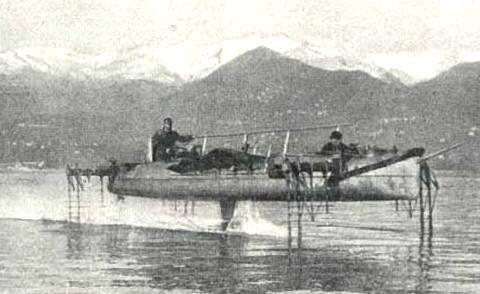
Hydrofoil boat 1910 Forlanini Idroplano - Lake Maggiore
The hydrofoil
The March 1906 Scientific American article by American hydrofoil pioneer William E. Meacham explained the basic principle of hydrofoils. Bell considered the invention of the hydroplane as a very significant achievement. Based on information gained from that article he began to sketch concepts of what is now called a hydrofoil boat.
Bell and Casey Baldwin began hydrofoil experimentation in the summer of 1908 as a possible aid to airplane takeoff from water. Baldwin studied the work of the Italian inventor Enrico Forlanini and began testing models. This led him and Bell to the development of practical hydrofoil watercraft.
During his world tour of 1910–1911 Bell and Baldwin met with Forlanini in Italy. They had rides in the Forlanini hydrofoil boat over Lake Maggiore. Baldwin described it as being as smooth as flying. On returning to Baddeck a number of designs were tried culminating in the HD-4, using Renault engines. A top speed of 54 miles per hour was achieved, with rapid acceleration, good stability and steering, and the ability to take waves without difficulty. Bell's report to the navy permitted him to obtain two 350 horsepower (260 kW) engines in July 1919. On September 9, 1919 the HD-4 set a world's marine speed record of 70.86 miles per hour. This record stood for ten years.
Bell was a supporter of aerospace engineering research through the Aerial Experiment Association, officially formed at Baddeck, Nova Scotia in October 1907 at the suggestion of Mrs. Mabel Bell and with her financial support. It was headed by the inventor himself. The founding members were four young men, American Glenn H. Curtiss, a motorcycle manufacturer who would later be awarded the Scientific American Trophy for the first official one-kilometre flight in the Western hemisphere and later be world-renowned as an airplane manufacturer; Frederick W. "Casey" Baldwin, the first Canadian and first British subject to pilot a public flight in Hammondsport, New York; J.A.D. McCurdy; and Lieutenant Thomas Selfridge, an official observer from the U.S. government. One of the project's inventions, the aileron, is a standard component of aircraft today. (The aileron was also invented independently by Robert Esnault-Pelterie.)
Eugenics
Along with many very prominent thinkers and scientists of the time, Bell was connected with the eugenics movement in the United States. From 1912 until 1918 he was the chairman of the board of scientific advisors to the Eugenics Record Office associated with Cold Spring Harbor Laboratory in New York, and regularly attended meetings. In 1921 he was the honorary president of the Second International Congress of Eugenics held under the auspices of the American Museum of Natural History in New York. Organizations such as these advocated passing laws (with success in some states) that established the compulsory sterilization of people deemed to be, as Bell called them, a "defective variety of the human race." By the late 1930s about half the states in the US had eugenics laws, the California laws being used as a model for eugenics laws in Nazi Germany.
Much of his thoughts about people he considered defective centered on the deaf because of his long contact with them in relation to his work in deaf education. In addition to advocating sterilization of the deaf, Bell wished to prohibit deaf teachers from being allowed to teach in schools for the deaf, he worked to outlaw the marriage of deaf individuals to one another, and he was an ardent supporter of oralism over manualism. His avowed goal was to eradicate the language and culture of the deaf so as to force them to integrate into the hearing culture for their own long-term benefit and for the benefit of society at large. Although this attitude is widely seen as paternalistic and arrogant today, it was mainstream in that era.
Although he supported what many would consider harsh and inhumane policies today, he was not unkind to deaf individuals who proved his theories of oralism. He was a personal and longtime friend of Helen Keller, and his wife Mabel was deaf, though none of their children were. Bell was well known as a kindly father and loving family man who took great pleasure in playing with his many grandchildren.
His son-in-law was National Geographic Editor Gilbert Hovey Grosvenor.
Tribute
In the early 1970s, UK Rock Group The Sweet recorded a tribute to Bell and the telephone, suitably titled "Alexander Graham Bell". The song gives a fictional account of the invention, in which Bell devises the telephone so he can talk to his girlfriend who lives on the other side of the United States. The song reached the top 40 in the UK and went on to sell over one million recordings world-wide.
Another musical tribute to Bell was written by the British songwriter and guitarist Richard Thompson. The chorus of Thompson's song reminds the listener that "of course there was the telephone, he'd be famous for that alone, but there's fifty other things as well from Alexander Graham Bell". The song mentions Bell's work with discs rather than cylinders, the hydrofoil, Bell's work with the deaf, his invention of the respirator and several other of Bell's achievements.
source:http://www.solarnavigator.net/inventors/alexander_graham_bell.htm
Mag-subscribe sa:
Mga Komento (Atom)